Hi,
In this tutorial, I will show you how to reproduce the icon of Photoshop CS4
At the end of this tutorial you will be able to do this icon:

First of all, create a photoshop document of 200px * 200px and a white background.
Create a new layer and with the Rectangular Marquee Tool, draw a black square and center it.

Double click on the layer of the square to open it Blending Options.
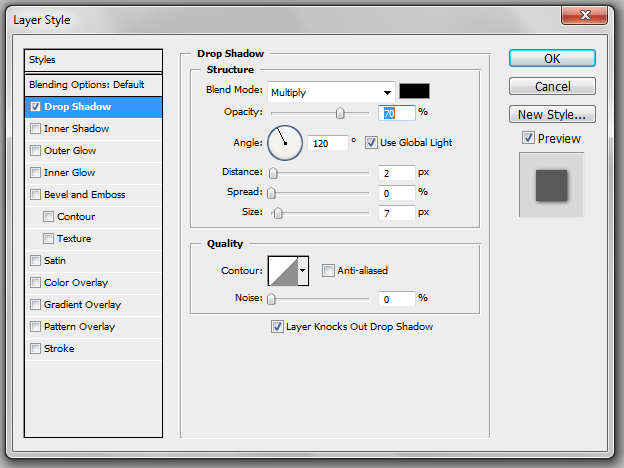
In the Drop Shadow menu, use these parameters:
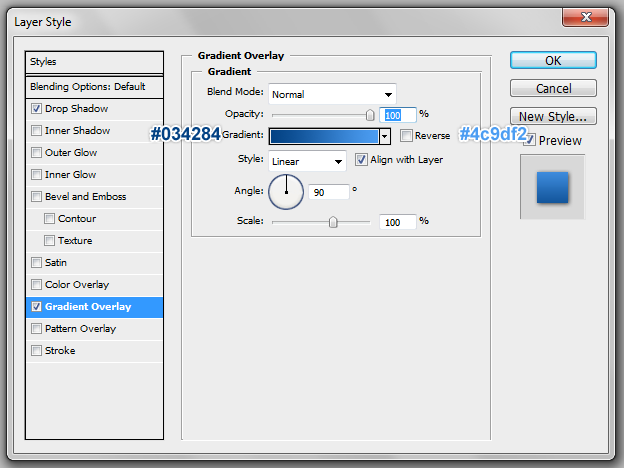
In the Gradient Overlay menu use these parameters:
Colors are: #034284 -> #4c9df2.
Then click on Ok.
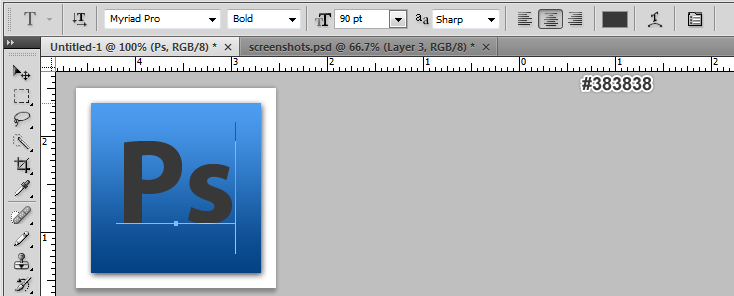
With the Text tool, write Ps (for Photoshop) with the Myriad Pro font in bold with a size of 100pt and the color is #383838.
Double click on the layer of the text to open it Blending Options.
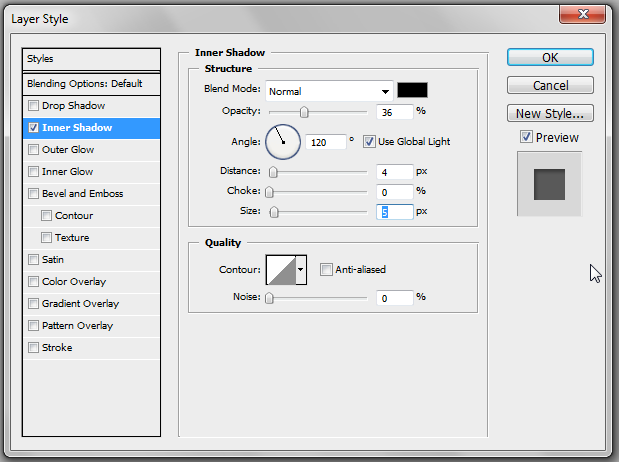
In the Inner Shadow menu, use these parameters:
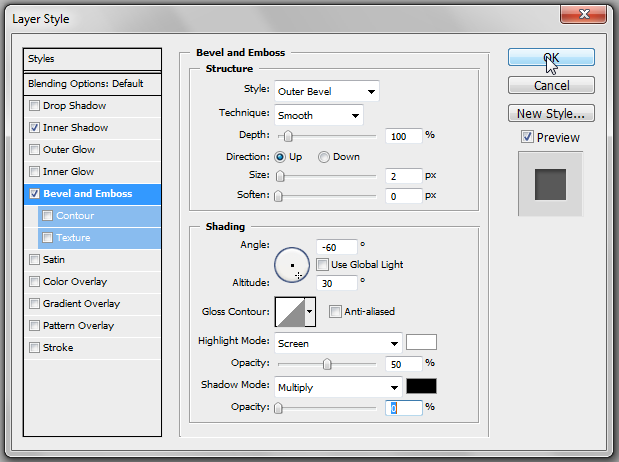
Finnaly, in the Bevel and Emboss menu use the parameters:
You should get something like that:
Thank you and I hope this tutorial will be useful.
Similar Scripts and Tutorials

![[Tutorial] Reproduce the Photoshop CS4 Logo](http://www.webestools.com/ftp/ybouane/scripts_tutorials/photoshop/logo_photoshop/img_preview.png) The 13/07/2011 at 23:26:34
The 13/07/2011 at 23:26:34![[Tutorial] Reproduce Google's Logo in Photoshop](http://www.webestools.com/ftp/ybouane/scripts_tutorials/photoshop/logo_google/img_preview.png) [Tutorial] Reproduce Google's Logo in Photoshop
[Tutorial] Reproduce Google's Logo in Photoshop
![[Tutorial]Fusion between 2 images with layers masks (Photoshop)](http://www.webestools.com/ftp/ybouane/scripts_tutorials/photoshop/merge_images/img_preview.png) [Tutorial]Fusion between 2 images with layers masks (Photoshop)
[Tutorial]Fusion between 2 images with layers masks (Photoshop)
![[Tutorial] Black and White image in Photoshop from a colored image](http://www.webestools.com/ftp/ybouane/scripts_tutorials/photoshop/black_and_white/img_preview.png) [Tutorial] Black and White image in Photoshop from a colored image
[Tutorial] Black and White image in Photoshop from a colored image
![[Tutorial]Create a web 2.0 Logo with photoshop (Web 2.0 Title)](http://www.webestools.com/ftp/ybouane/scripts_tutorials/photoshop/web20_title_logo/img_preview.png) [Tutorial]Create a web 2.0 Logo with photoshop (Web 2.0 Title)
[Tutorial]Create a web 2.0 Logo with photoshop (Web 2.0 Title)
![[Tutorial]Add a reflect to an image with photoshop](http://www.webestools.com/ftp/ybouane/scripts_tutorials/photoshop/reflect/img_preview.png) [Tutorial]Add a reflect to an image with photoshop
[Tutorial]Add a reflect to an image with photoshop